Why is context-driven forecasting valuable?
Better context leads to clearer forecasts that stay closer to current conditions and real decisions.
Explore context-driven forecasting


ForesightXL helps finance teams turn historical numbers and business context into explainable forecasts inside Excel.
Install the Excel add-in and generate your first forecast in under 60 seconds. Includes 5 free forecasts.

What ForesightXL is
ForesightXL combines historical data with natural-language business context to generate explainable forecasts without disrupting how teams already work.
We call this Context-driven forecasting.
It's a practical, low-risk way to start using AI inside Excel.
See ForesightXL in action
How ForesightXL works

ForesightXL uses your historical Excel data to create a base forecast. No migration. No new system.

Add meeting notes, comments, reports, emails, a website or bullet points in plain English.

ForesightXL adjusts your base forecast using the context you provide, then explains each change.
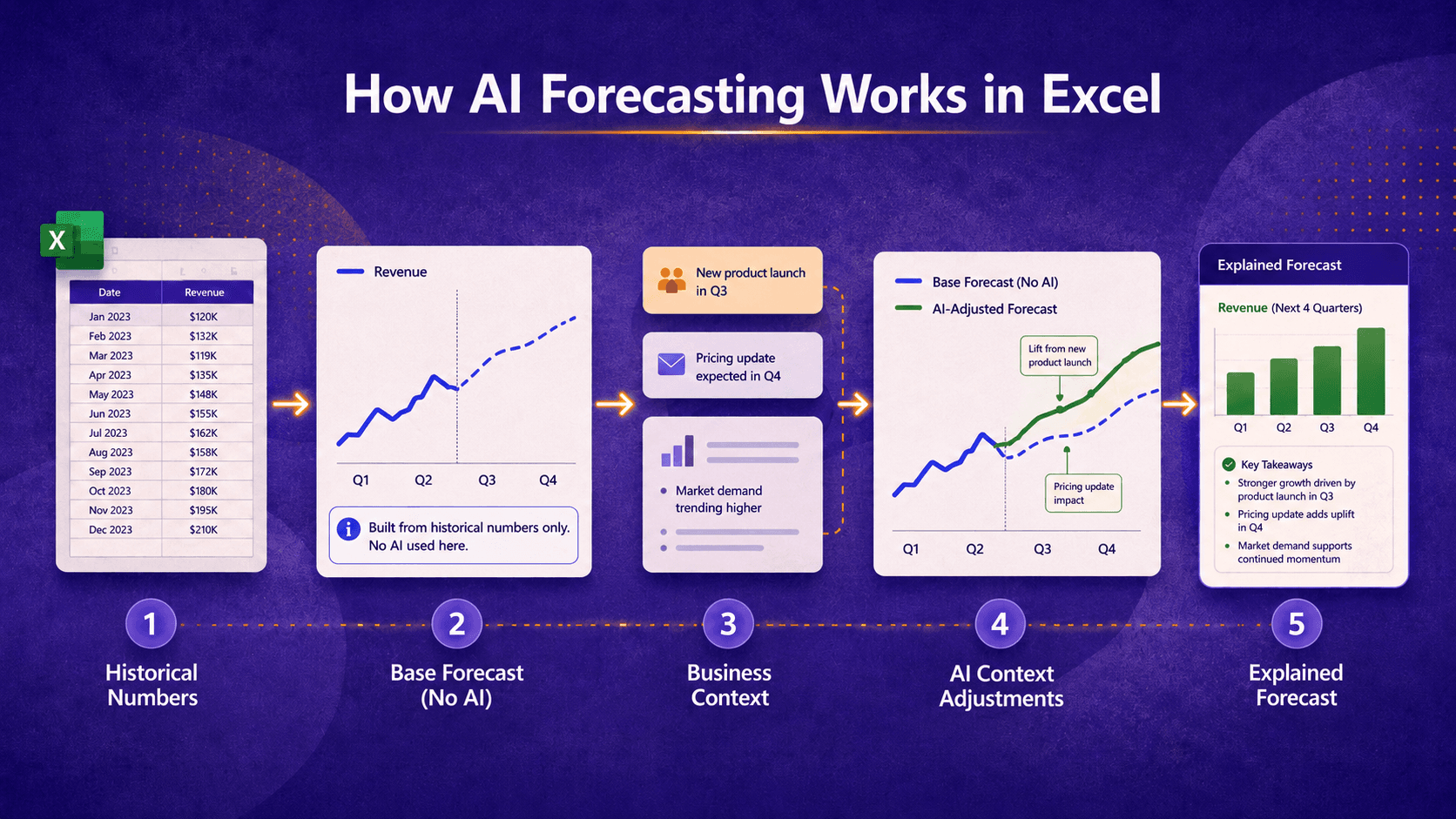
ForesightXL starts with historical numbers to create a base forecast without AI, then uses AI to apply business context and explain each adjustment.
What ForesightXL costs
$19 USD / month
Simple pricing for individuals and teams.
New users get 5 free forecasts before subscribing.
Key Benefits of ForesightXL
No implementation, no new systems, and low monthly cost.
Works with your existing workflow
Install and start forecasting right away
Forecasts are generated in under 60 seconds
Combines data with plain-English inputs
Every number is explained and traceable
No formulas. Easy to review
What ForesightXL delivers
Works alongside traditional forecast models.
Helps executives test assumptions and explore what-if scenarios using plain English business context.
Including trend and seasonality, built consistently from historical data
Each forecast is broken into baseline, recurring effects, drivers, constraints, and strategic adjustments
Each value includes an explanation linked back to the context provided
A concise summary of the forecast and the context shaping it
A clear visual showing your historical data and forecast output
Three prompts to help turn vague context into clearer assumptions
The output is always presented in the same structure to enable use in broader workflows
Each forecast run is saved with its input and output sheets for later review
Better context leads to clearer forecasts that stay closer to current conditions and real decisions.
Explore context-driven forecasting
When forecasting context is too broad, results become inconsistent and difficult to compare.
ForesightXL addresses this by returning three practical suggestions to tighten and refine the input.
Over time, this helps teams produce more consistent forecasts, clarify assumptions earlier, and have better forecasting conversations that lead to more reliable, decision-ready insights.
Explore how Context-Driven Forecasting Improves Traditional FP&A Forecasts
AI Forecasting
Understand how ForesightXL starts with historical numbers, applies business context, and explains each adjustment.
See how meeting notes, emails, reports, and business assumptions can improve forecast conversations.
Learn how ForesightXL supports controlled, explainable AI-assisted forecasting inside Excel.
Better forecasts help finance and leadership test decisions, refine assumptions, and stay aligned with current business thinking.
Explore how better forecasting keeps finance relevant
Use cases
Explore common forecasting scenarios where teams use ForesightXL to speed up cycles, clarify assumptions using plain English, and rapidly produce explainable, structured outputs inside their existing Excel workbooks.
Overview of the add-in and the explainable forecasting workflow.
Explore AI forecasting in ExcelInstall and forecast directly inside Excel without new systems.
Explore the Excel forecasting add-inFaster cycles with structured context and clearer assumptions.
Explore AI forecasting for FP&AExplainable forecasts to guide finance planning and decisions.
Explore financial forecastingUpdate forecasts quickly as conditions and inputs change.
Explore rolling forecastsCombine historical demand with real-world context in Excel.
Explore demand forecastingClarify drivers, assumptions, and expected revenue outcomes.
Explore revenue forecastingCompare what-if scenarios with consistent, explainable outputs.
Explore scenario forecastingComparisons
Generate forecasts using plain English in under 60 seconds, inside Excel.